
Thinkware Dash Cam U3000 – Review

DISCLOSURE – THIS ITEM WAS GIFTED TO THE REVIEWER FOR THE PURPOSES OF WRITING THE REVIEW. ALL THOUGHTS AND OPINIONS ARE THE REVIEWER’S OWN.
Reviewed by Colin Hewitt
Recently I’ve grown to hate driving. I know this is an odd thing to say when I’m about to review a dash cam. However, bear with me. Where I live, the roads have become increasingly congested. Everyone seems to be in such a hurry to get from A to B.
I cannot categorically say driving standards have deteriorated, I suspect that’s a rose-tinted glasses impression brought upon by old age, however I hear myself muttering things like, ‘I don’t believe they just did that’ or ‘ I wish I had a camera’, more and more often. I also worry that if I experienced something more serious that an observed bit of recklessness, I’d have a problem proving that I was the innocent party.
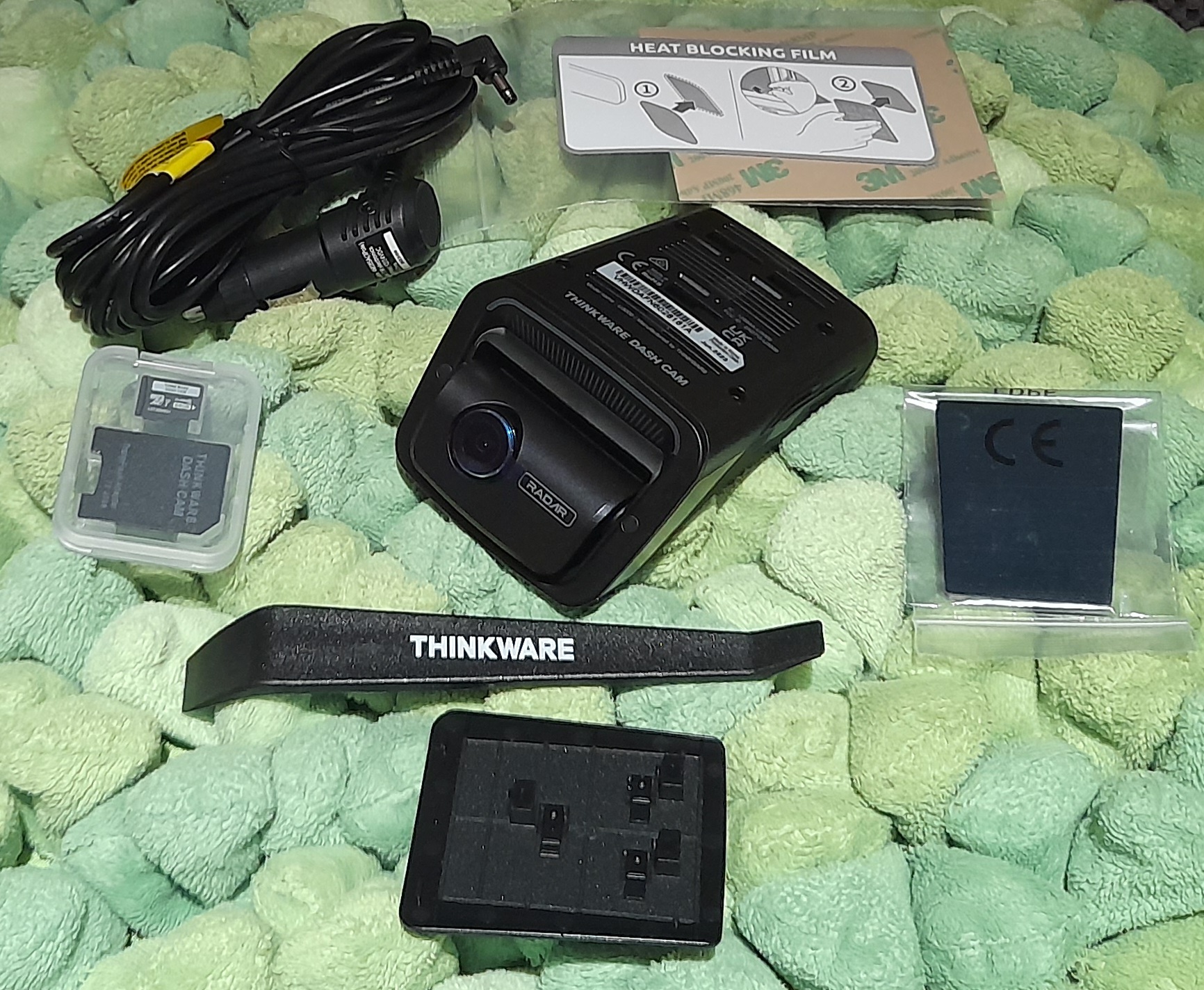
For these reasons, among many more, I was delighted when asked to review Thinkware’s flagship dash cam, the U3000.
The U3000 is a two-channel dash cam system (there’s an optional rear camera). For this review, I am concentrating solely on the front camera only configuration.
For the technically minded, the front camera records in 4K UHD at 30fps or 2K QHD at 60fps. It has a wide-angle lens of 152 degrees and uses Sony STARVIS 2 image sensors to enhance performance in low-light conditions. For the non technically minded, this means that the picture quality during the day and night is, simply put, brilliant. The best I have seen on any dash cam.
What’s in the box?
Front Camera Unit itself
A mount
Car Charger
Hard-wire cable (I opted not to use this, but it opens further functionality – more of this later)
Trim Tool
Heat Blocking Film
Adhesive Cable Holder
Micro SD Memory Card (64GB) and adaptor (upgradeable to 128GB if required)
CPL Filter
Warranty Information
You can read the comprehensive 35 page user manual online: thinkwarestore.com
Installation:
Installation of the Thinkware U3000 was reasonably straightforward. I followed the instructions in the manual with no major problems – there are also some great independent videos on YouTube if you need some help.
Basically you attach the mounting plate to your windscreen with a piece of heat blocking film and double sided sticky tape. To place or remove the dash cam, simply slide it into the mounting plate inserts.
A minor criticism would be that, personally, I would prefer a suction mount, (or a magnetic mount) rather than the adhesive method. If needed, users could easily place the dash cam in different vehicles by using a suction mount. It’s not so easy with the adhesive method. I couldn’t see from the Thinkware website whether you can purchase additional mounting plates, however it would be surprising if you couldn’t.

Powering the unit:
I used the basic charger lead, which simply plugs into your car’s 12V accessory outlet (formerly known as a cigarette lighter). I routed the cabling around the windscreen, using some adhesive tape.
If you decide to hard-wire your unit directly to your vehicle’s fuse box via the supplied leads (and Thinkware stress, that only a trained mechanic should undertake this), it opens up the additional functionality of Parking Mode. Parking Mode enables the camera to record even if your engine is off. The camera will detect impact and nearby motion.
An alternative method of supplying continuous power to the unit is to plug it into the OBD-II port of your car (the diagnostics port) by purchasing an OBD-II installation cable from Thinkware (£29.99). Having used the unit for a few days, I’m seriously considering this option.
Basic Use:
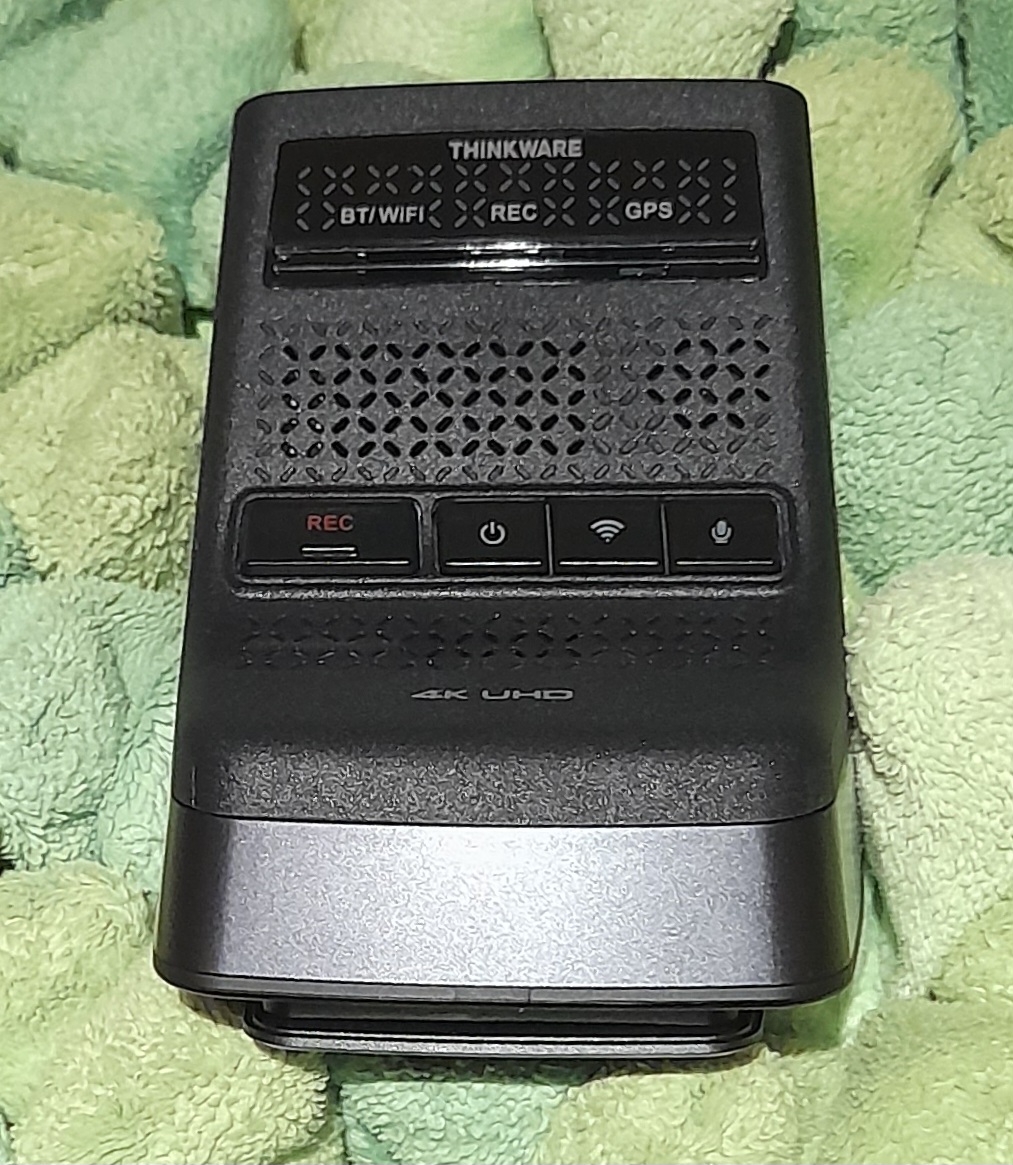
This couldn’t be easier. Start the engine and the recording starts (that is, it records if you remember to insert the SD card into the camera – unlike a reviewer who isn’t sitting too far away from this keyboard).
There are other options, especially if you have hard wired the device. But for the initial basic operation, this could not have been simpler.
You should be aware, depending on the size of SD memory card you are using, the recording will at some point overwrite the initial recordings, however this is a better option than the recording just stopping.
Playing back recordings:
I downloaded the Thinkware Dash cam link from the Google Play Store (I have an Android phone, but a version is also available from the Apple App Store). Here you can watch live videos from the camera (only if your engine is on, if you haven’t hard wired the device) and gain access to your recordings via Bluetooth.
There was a bit of fiddling around trying to get the app working, especially to view the image in real time, but I got there, and again there’s a lot of help online from people who have been there before.
You can also play the videos back on your PC or laptop by removing the SD card and inserting in the device of your choice. I preferred this method as the screen was obviously much larger than my mobile phone.
Initially, I thought there was a bit of barrelling with the image, however this turned out to be my adjustments rather than the capture itself. By repositioning the lens, the image became non-distorted.
The U3000’s video captures were excellent. Colours were very true and realistic. The detail was clear and crisp. As expected, with such high definition, I could easily identify car registration numbers. There was a lot of information shown on the recordings (your vehicle’s speed, location, etc.) which would be of significant benefit if you were unfortunately involved in a collision.
Summary:
I won’t pretend that the Thinkware U3000 is a cheap dash cam. Yes, there are far cheaper models available. However, as the cliche goes, “you pays your money, and you takes your choice”. Here, for your money, you’re getting exceptional quality and great functionality. I haven’t seen a dash cam that comes close in terms of excellence and the range of functions it offers.
Before purchase, to ensure this is the model for you, I’d highly recommend thoroughly reading the user manual. I’ve only touched on a few of the camera’s functions in this review.
Rating: Whilst appreciating that this is a very expensive dash cam, and I would personally prefer a different mounting method, it still deserves an outstanding 5/5
Rating: 5/5
RRP: £399.00
For more information or to buy direct, visit thinkwaredashcam.eu