
Roku Streaming Players Review

We are very much changing the way we watch TV – not just in our house but across the country and beyond. It wasn’t that long ago that your options were either standard, terrestrial TV (and I remember when there were just 4 channels!), or, if you were lucky, a Sky or cable subscription. Then streaming services appeared, which were mostly used to supplement normal TV viewing and to watch the odd film. Now though, most of us use at least one streaming service, some of us have several and lots of households have knocked traditional TV on the head completely and stream all of their on-screen entertainment.
We love streaming in our house – it means we can watch what we want, when we want to and without worrying about timings or adverts. We don’t, however, have a smart TV; my reasoning being although they were bought before smart TVs were a thing, there is nothing wrong with any of the TVs in the house and I can’t justify replacing them at the moment. So we use streaming devices, and we have a few of them! In the house, we have what I would call ‘the big three’ – NOW TV and Amazon Firestick, both of which came with their respective streaming services, and a Chromecast which is more open, but doesn’t have a remote or interface so the kids struggle with it somewhat. None of the streaming devices we have are without their disadvantages, so when I was asked to try out a couple of products from ROKU, I was more than happy to give it a go.
ROKU in the UK have three different streaming players available: their entry level ROKU Express (RRP: £29.99), mid-range ROKU Premiere (RRP: £39.99) and their top of the range ROKU Streaming Stick + (RRP: £49.99). We were sent the ROKU Express and ROKU Streaming Stick + to try out, both of which would make fantastic purchases for the upcoming festive season as well as being cracking Christmas gift ideas.
The first one that we tried out was the ROKU Streaming Stick +, which as you can probably guess by its name, is a ‘stick’ streaming device rather than a set-top box. The Streaming Stick + plugs directly into the HDMI port of your TV and boasts some pretty impressive specs – not only does it stream in HD, it also supports 4K and HDR as well as voice search, an enhanced remote control and, crucially for us, up to 4 times the WiFi range of a standard steaming device, making it a great choice if your router is further way from your TV. Our house is a three-storey house and the router is on the bottom floor so we can have issues streaming TV in the bedrooms with signal drop out and buffering, so we couldn’t wait to see if this would solve our problems!
Setting it up quite simply couldn’t have been easier and we were fully set up and ready to go in less than ten minutes. Contained in the box is:
- ROKU Streaming Stick +
- Enhanced remote control
- 2 x AA batteries
- USB Power cable with signal booster
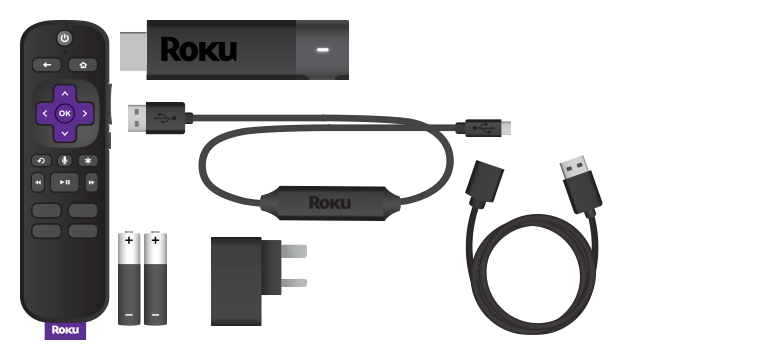
Setting the device up is as simple as plugging the Streaming Stick + into the HDMI port at the back of the TV and plugging the USB power cable in. It’s then just a case of popping the AA batteries into the remote control and following the on-screen instructions. The simple setup process takes you through connecting the stick to your home WiFi network and installing any apps that you might want.
The range of apps is one of the massive plus points for the ROKU products – we have subscriptions to Amazon Prime Video, Netflix, NOW TV and Spotify, as well as occasionally using Google Play to watch newer material. The ROKU is the only system we have that supports all of these services which is great for us – up to now, we have had a NOW TV stick (which doesn’t support Amazon Video) and an Amazon Firestick (which doesn’t support NOW TV) in the bedroom which, along with the Blu-ray player, takes up all of the HDMI ports. Being able to just use one device to be able to use all of my subscriptions is a definite bonus and is an awful lot easier than flitting between HDMI ports.
As well as the paid subscription services, ROKU also has apps for the main UK catchup TV services, so we were able to download BBC iPlayer, ITV Hub, All4, Demand 5 and more, as well as YouTube and TuneIn Radio. I am really impressed with the ROKU interface – it’s so slick and pleasant to use and is very intuitive. All of the apps are laid out very simply and the remote is also a doddle to use, so locating the service that you want really does take seconds.
Speaking of the remote, with the Streaming Stick + being ROKU’s top of the range offering, it comes with an enhanced remote. This gives it a number of extra features over the standard remotes on the other two models – this one has voice search and TV volume control as well as Quick Launch buttons. The voice search is fab and works really well, especially for my youngest as she doesn’t always have the patience to type the name of what she wants to watch into the search box. We found the voice search to be really reliable and accurate, and it understood both adult and child voices really well. She also found the Quick Launch buttons to be very useful – Netflix, Google Play, Spotify and Rakuten TV all have their own permanent, branded buttons on the remote, so can be launched immediately and without having to search.
I think my absolute favourite feature though is one that I would never have thought would be as useful as it is – the fabulous search function. This one will search a number of your services for a film, series or actor all at the same time, so if you want to watch a Tom Hanks film, you just type (or voice search) Tom Hanks into the search function and a list of his films will appear. Once you have chosen one and selected it, the system tells you which services it is on (it searches Netflix, Amazon Video, Apple TV +, NOW TV and Google Play), and indicates whether you have a subscription to that service, or if it is available to buy or rent from a PPV service. This is a fantastic feature and makes finding something to watch so much easier as you don’t have to loads up all of the apps individually to search for the film or series you want to watch, they are all in the one place together. Unfortunately, the catchup services don’t work with it at the moment but I have everything crossed that they might in the future!
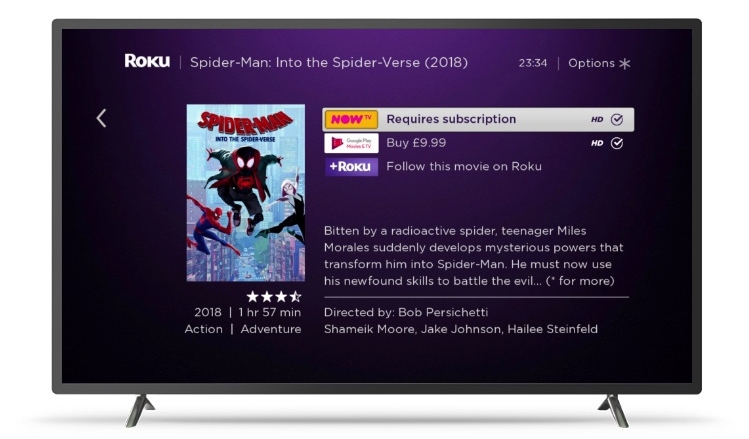
Finally – the advanced wireless receiver – does it actually make a difference? Well, the short answer is that yes, it does! After spending years with buffering on the bedroom TV because it’s so far from the router and blaming my ISP, we are now able to watch uninterrupted TV. There really is a significant difference with it compared to any of the other streaming devices we have used before and it’s well worth the slight extra cost just for that aspect.
For £49.99, the ROKU Streaming Stick + is an absolutely fantastic product and I can’t find a single negative thing to say about it. The menu system is quick and works very well, the interface is intuitive and simple to use, and I’m delighted with the search function. Having the advanced wireless receiver makes a great difference to us, with the awkward lay out of the house and has made watching TV so much less frustrating. This would make either a fantastic Christmas present or a super gift to the house before Christmas, so you can enjoy that special time off together.
If you don’t need all of the advanced features of the Streaming Stick + and you’re looking for a more ‘stocking filler’ priced present, the ROKU Express might be the right one for you. It’s slightly different to the Streaming Stick + in that it is a mini box rather than a stick, and comes with the standard remote control rather than the enhanced remote control. At just £29.99, it’s £20 cheaper than the Streaming Stick +, but still has the vast majority of the features, so this one can be a good choice too.
Despite its lower price tag, the ROKU Express still features full HD (1080 rather than 4K), has access to the same massive range of apps as the more expensive model and is just as easy to set up. Contained in the ROKU Express box is:
- ROKU Express box
- Standard remote control
- 2 x AA batteries
- HDMI cable
- Micro USB power cable
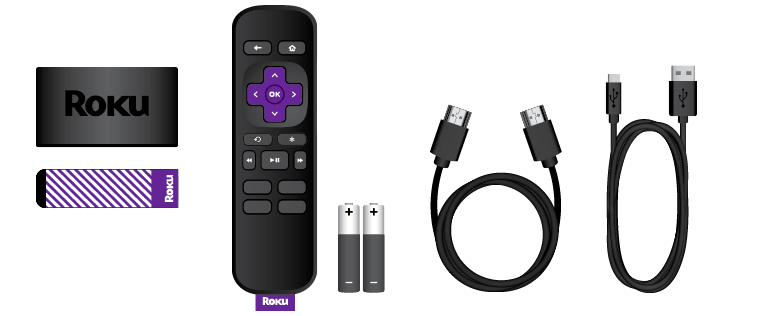
The setup process is very simple, and it’s just a case of plugging it in to the power and to the HDMI port, inserting the batteries and connecting it to the WiFi before installing the apps that you want to use. Given as this is a box rather than a stick, it’s probably not ideal if you have a wall-mounted TV but is absolutely ideal for a standard TV set up on a TV stand.
The kids don’t have a 4K TV in the playroom, it’s a standard 1080HD TV, so the Express is absolutely perfect for them in there. For the most part, standard HD is more than good enough for most people’s uses, especially if you don’t have an ultra-large, 50” + TV. The remote still features the Quick Launch buttons, so the kids can launch Netflix and Spotify at the touch of a button, although it doesn’t support voice search, so they do have to type their searches in rather than speaking to the remote.
Whilst the experience isn’t quite as ‘premium’ as the Streaming Stick +, we think the Express is also a fantastic product. It keeps the connection and streams seamlessly, has the same excellent range of apps as the more expensive product and is just as easy to use and set up. At £29.99, it makes a great stocking filler present for a teenager so they can have TV in their bedroom or is a great option for a second TV, like we do in the playroom.
Rating: 5/5
RRP: from £29.99 to £49.99
For more information or to buy visit www.roku.com.
