
Pocket Memories Photobook Review
THESE ITEMS WERE GIFTED TO THE REVIEWER FOR THE PURPOSES OF WRITING THE REVIEW. ALL THOUGHTS AND OPINIONS ARE THE REVIEWER'S OWN.
Reviewed by Kathryn Harrison
Since having kids and despite having a heck of a load more photos on my camera roll, I’ve had less time to print out those fabulous memories. Once upon a time, I created a photobook to commemorate every year. On hearing about a new app that promises ‘beautiful photobooks in 3 minutes from £3.99’, I was eager to give it a go. It initially appealed as being able to use my phone to create a photobook on an app specifically designed to do the job, felt very handy.
‘Pocket Memories’ was launched in October 2020 and is free to download from Apple and Google stores. As the brand name suggests, the books are smaller than many of the others on the market but of course, we’re all familiar with the saying ‘the best things come in small packages’. And the size is also reflected in the price, making these little personalised books the perfect stocking fillers.
The photobook market is pretty saturated and we may all have a favourite company to use. That said, if you’re looking to create something small, quickly, at a brilliant budget price that doesn’t sacrifice the quality, then Pocket Memories is certainly worth an explore.
The app was straightforward to download and like with anything new, I spent a couple of minutes exploring its features and getting comfortable with the controls.
When you open the app you arrive at a dashboard where you select the style of book you’d like to create. Currently, there are three options:
* Mini Pocket Book: Softcover – 95×95mm – £3.99
* Midi Photobook: Softcover – 140x140mm – £5.99
* Luxury Photobook: Hardcover 140x140mm – £7.99
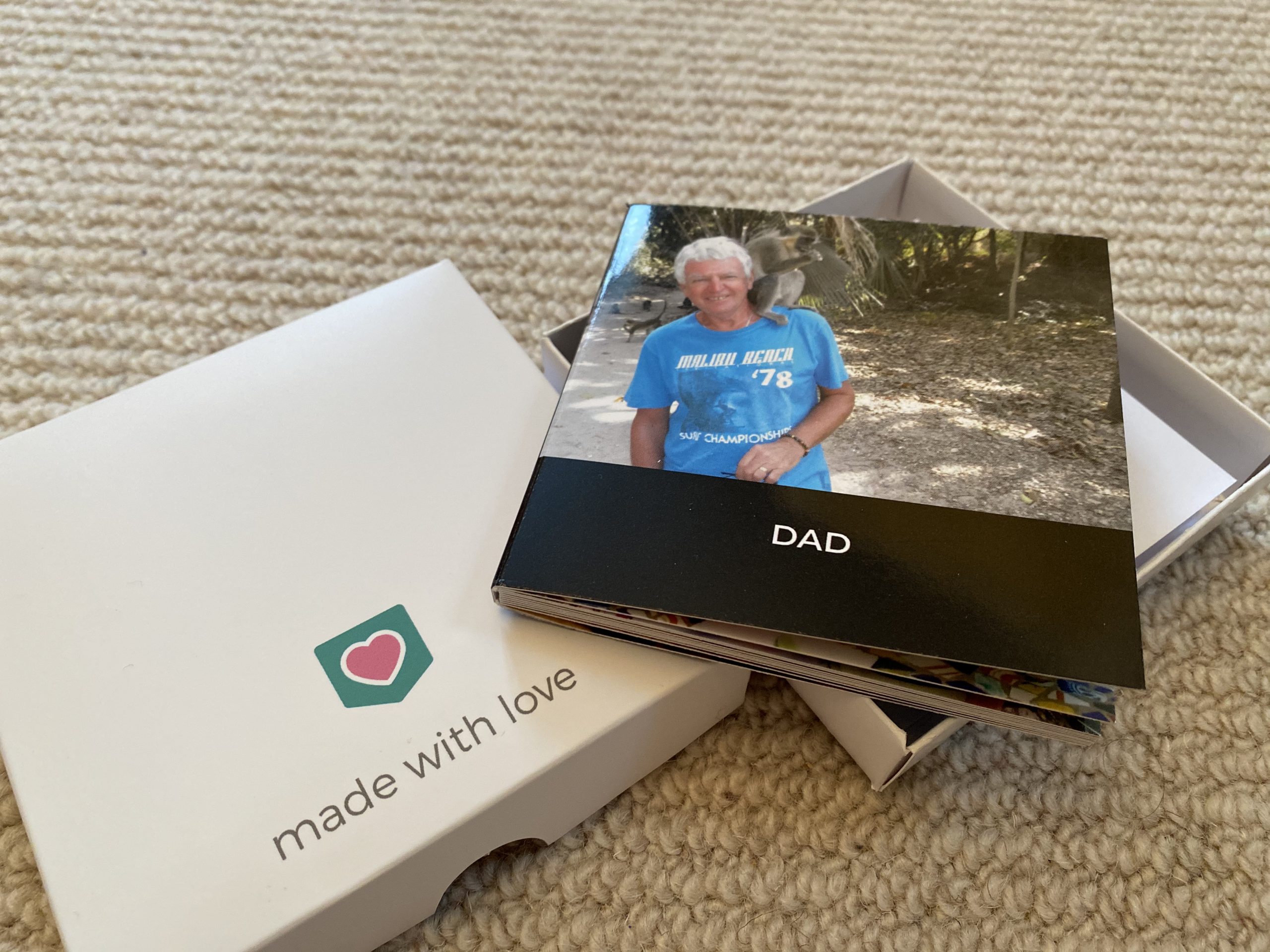
I decided to create two books, starting with a Mini Pocket Book. Many of the photos of my dearly departed Dad are pre-digital so I managed to carefully take photos of the original, somewhat dogeared photos, to create a Memory Book in his name. I’m very happy with it.
When you’ve selected the type of book you’d like to make, the app then asks you to select 20 photos manually. Alternatively, you’ll see it states: ‘We have automatically created some books for you using our AI’ (artificial intelligence algorithms). However, I could not find a way to view these. I contacted Customer Services and whilst they’ve been quick to try and help and offer potential solutions and check my phone is set-up correctly, the issue has yet to be resolved. As a relatively new company, I think there may potentially still be a few issues with the app’s ability to work across all platforms. This particular problem didn’t really affect me too much as I prefer to select my own photos when creating a photobook and the tools to do this, worked perfectly. The app’s Editor is basic and minimalist but it also allows you to create a lovely little book very quickly.
The biggest restriction with ‘Pocket Memories’ is that each book has to have 20 pages; there’s no leeway. Thus, documenting an event or occasion via this app won’t be an easy task for the snap happy amongst us. The second product I created was a Luxury Photobook. I wanted to create a memory of my Hen Do Weekend, however, the limited number of pages and photos meant this wasn’t possible. Instead, I used photos from just one evening; the night my friends and I hit the bars of York, dressed as old ladies! This book is certainly something that will make me giggle when I look back at it, especially when I really am an old lady.
Once you’ve selected your initial 20 photos, it’s time to edit them. This isn’t necessary but if you like, you can play with the layouts, reorganise the pages, add filters to photos and crop them. You can stick to one photo per page or as the seamless book lies flat, you can use two pages as a double page spread, inserting one, two or three images on each. Additional photos are added as you go along, so there does need to be a little forethought if you’re going to be using more than your first pick of 20 photos.
The app doesn’t let you change the size or position of the photos and similarly, whilst you you can change the colour and the font of your text for the photobook’s front cover, you can’t alter its layout. You also can’t add text on the inside pages.
‘Pocket Memories’ state that one of the main reasons for creating the app was to help people avoid the sometimes long-winded and difficult process of editing photobooks. They’ve succeeded but it also means this app isn’t for everybody. I felt I lacked a little control and it didn’t satisfy the creative genius that hides within me.
Once you have made your photobooks, you can add them to your cart. However, when I tried to add two different photobooks, it wouldn’t let me. You have to purchase one at a time (unless you’re buying multiples of the same book), which of course, rakes up the packaging and postage costs. The p & p is actually very reasonable and I think it was more the principle and the extra time, that rubbed me up the wrong way, though, pennies do make pounds. When I discovered I couldn’t add more than one book to my cart, I instinctively thought it was an error on my part. Once again I emailed Customer Services, who fair play to them, got back to me within 24 hours, albeit it with a reply that didn’t truly satisfy. This is definitely an area of the app and customer journey that could be improved.
If you decide to make a photobook as a gift, ‘Pocket Memories’ give you the option to add a presentation box for £1.99. This is a worthwhile buy as it does add the final, finishing touch to a potentially much appreciated present.
On receiving my two photobooks, which arrived very promptly, I was more than happy with them. The books are made of recycled materials and both are lovely and glossy, the colours are vibrant and look and feel high quality.
All in all, if you’re looking for a minimalistic photobook that won’t take you days on end to create, for a budget price but with a high quality finish, I’d recommend you give Pocket Memories a go.
Rating: 3.5/5
RRP: Photobooks from £3.99
These products can be purchased from the Pocket Memories website here.